Visitor Acquisition Dashboard Overview
Have you wanted to know how your website is performing vs. your peers? Now you can!
Access the new Visitor Acquisition Dashboard to:
- Track how many unique visitors are coming to your website
- Learn where your website visitors are located
- Review where your visitors are originating from – the source and the category are both available as well as a combined view
To access:
Login to iCC, go to the Performance menu, then select Visitor Acquisition
NOTE: If you have more than one website, select the website
you want to view from the drop-down above the dashboard.
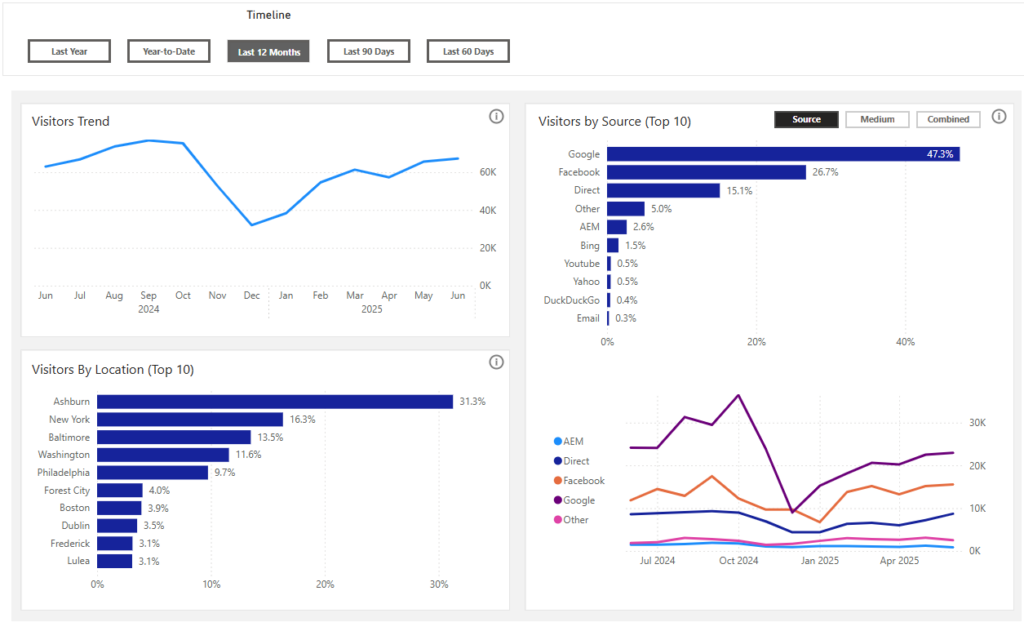
Reading the Dashboard
Timeline Options (defaults to Last 12 Months)
- Last 12 Months: last rolling 12 months by month
- Last Year: last full calendar year by month
- Year-to-Date: all months in current year by month
- Last 90 Days: each day for last 90 days (scroll bar)
- Last 60 Days: each day for last 60 days (scroll bar)
Visitors Trend:
Website Visitors count trend (unique visitors)
Visitors by Location (Top 10):
Top 10 locations your visitors are coming from
Visitors by Source (Top 10):
Your visitors as a percentage of total visitors and trending visitor info by:
- Source: Where the visitors originated from.
- Medium: The category of the sources where visitors originated from.
- Combined: A combination of the source and medium.