Since releasing the Peer Benchmarking Dashboard to see how your website is performing vs your peers, we have made some improvements to help you dig into the data even more.
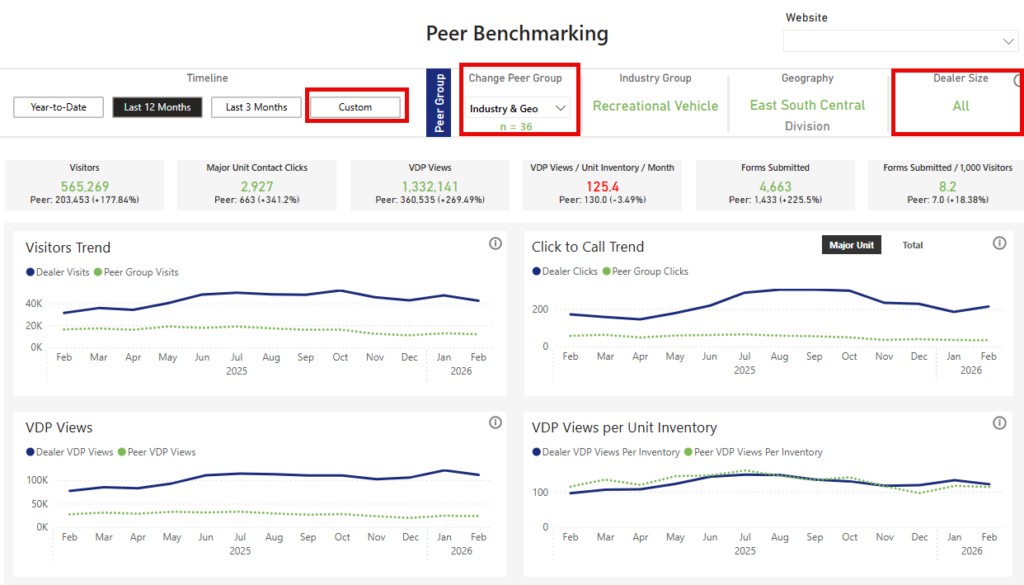
Change Peer Group
Now you can select which peer group you want to see with three different categories.
- If you choose Industry & Geo, you’ll be compared to dealerships of all sizes.
- If you choose Industry & Size, your comparison will focus only on dealerships in the same size category as yours.
- If you choose Industry, you’ll be compared to all dealerships.
Dealer Size Added
You’ll now see a new “Dealer Size” indicator, which groups dealerships as Small, Medium, or Large based on their average active inventory over the past 12 months.
Clearer Peer Group Size
To make room for this new feature, we removed the “Peer Website Count” tile.
Instead, you’ll now see a simple “n = x” displayed at the top of the dashboard, showing exactly how many dealerships are included in your peer group (for example, n = 36).
More Flexible Date Filtering
We’ve added a Custom date filter, giving you more control to view performance for specific months or date ranges that matter most to you.
To simplify the experience, we’ve removed some preset options like “Last Year,” “Last 90 Days,” and “Last 30 Days.”
To learn more about the Peer Benchmarking Dashboard, take a look at the Using The Peer Benchmarking Dashboard article.